
Your gigs in one place.
Your time in focus.
Click Work Tracker brings earnings, minutes, and screenouts into one routine—so you can see what your mix of surveys, usability tests, and other online work is actually producing.
Log your activity, compare the results, and keep your platform payout records alongside it. A tracker organizes the work you record; it does not supply jobs or guarantee earnings.
Stop piecing together your earning day
A research dashboard shows its studies. A testing platform shows its tests. Neither tells the whole story when you use several services. Click Work Tracker gives you a place to record that activity together and review your overall pattern.
Use it for a simple question: did this week’s results justify the time I put in? A memorable $30 test and ten unsuccessful applications belong in the same decision, even though only one produces an exciting notification.
Record the reward
Keep amounts tied to the platform and work that produced them.
Include the effort
Add accurate minutes and record screenouts rather than forgetting unsuccessful attempts.
Review the mix
Use totals and platform comparisons to decide what to keep, pause, or check less often.
It fits naturally alongside the Survey Stacking Strategy and the Core Four Starter Stack. Build a manageable routine, then let your own records tell you whether it is working.
Built around the way online gigs happen
Fast entries
Tap-based amounts and presets reduce repetitive typing. Use the actual reward rather than assuming a preset matches every task.
Platforms and goals
Organize activity by platform and review progress toward your chosen targets. A goal is a planning aid, not a forecast.
Screenout logging
Keep unsuccessful attempts visible when deciding where your effort goes.
Dashboard and history
Review trends, platform comparisons, and individual entries instead of relying on memory.
Export and backup
Keep a copy of your records and use exported data for your own analysis. The settings screenshot below shows CSV and JSON options.
Web and Android access
Open the browser version or visit the Android listing for the current app details.
Four views of Click Work Tracker
The original screenshots are preserved below. Select any image to inspect it at full size. They show an earlier interface and recorded example values; labels, layouts, and available features may change. Amounts and hourly figures in these images are not earnings forecasts or a statement of typical platform pay.
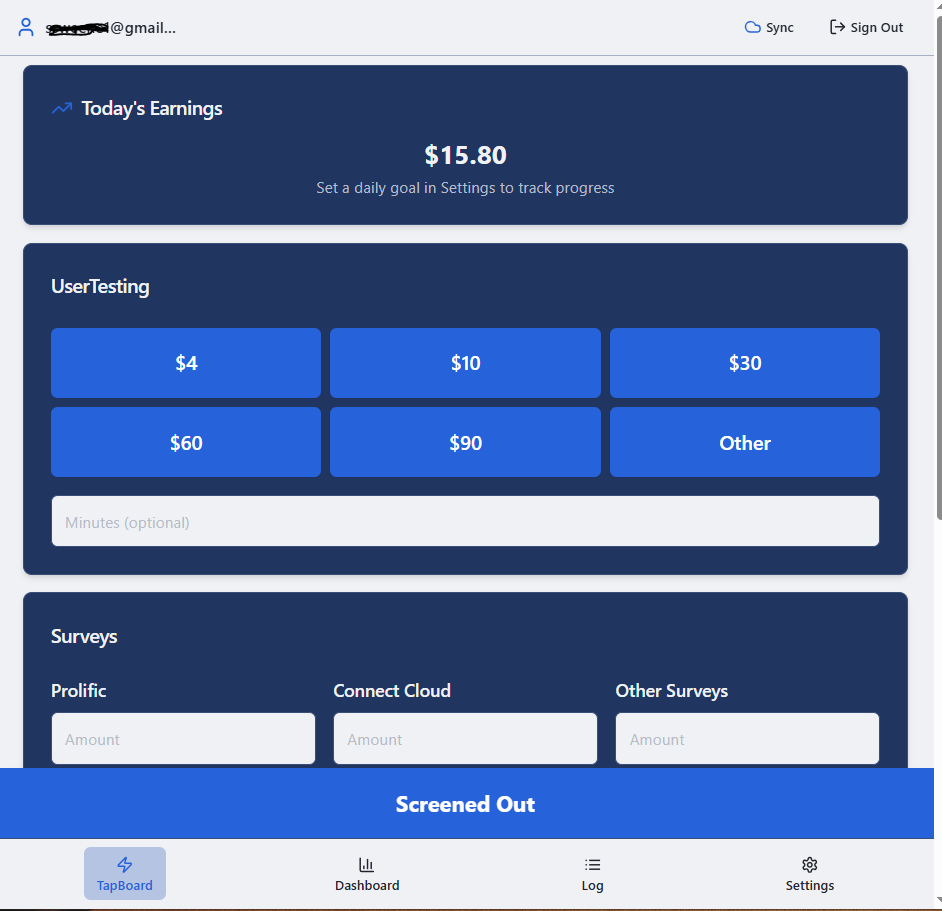
Quick entry with TapBoard
Preset amount buttons, survey amount fields, optional minutes, and a Screened Out control bring common entries together.
View full size →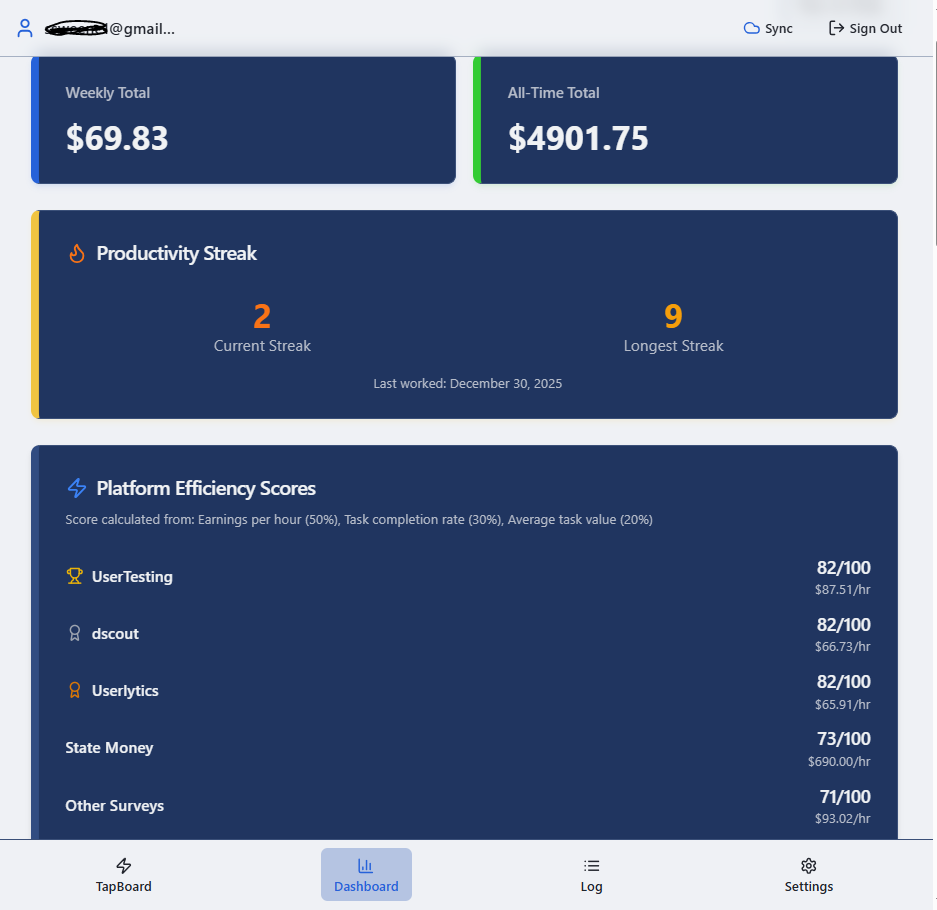
Dashboard and comparisons
Recorded totals, streaks, and platform efficiency scores help you review the activity you have entered.
View full size →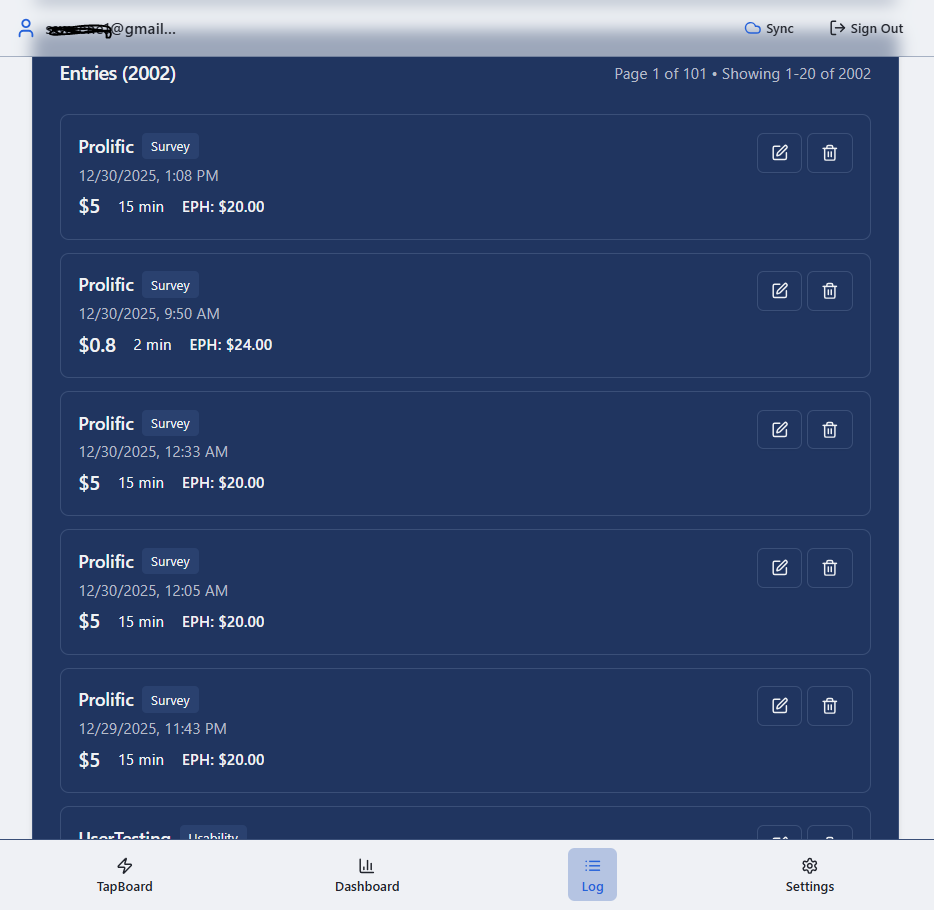
Activity log
Entries show the platform, amount, minutes, and an earnings-per-hour figure, alongside edit and delete controls.
View full size →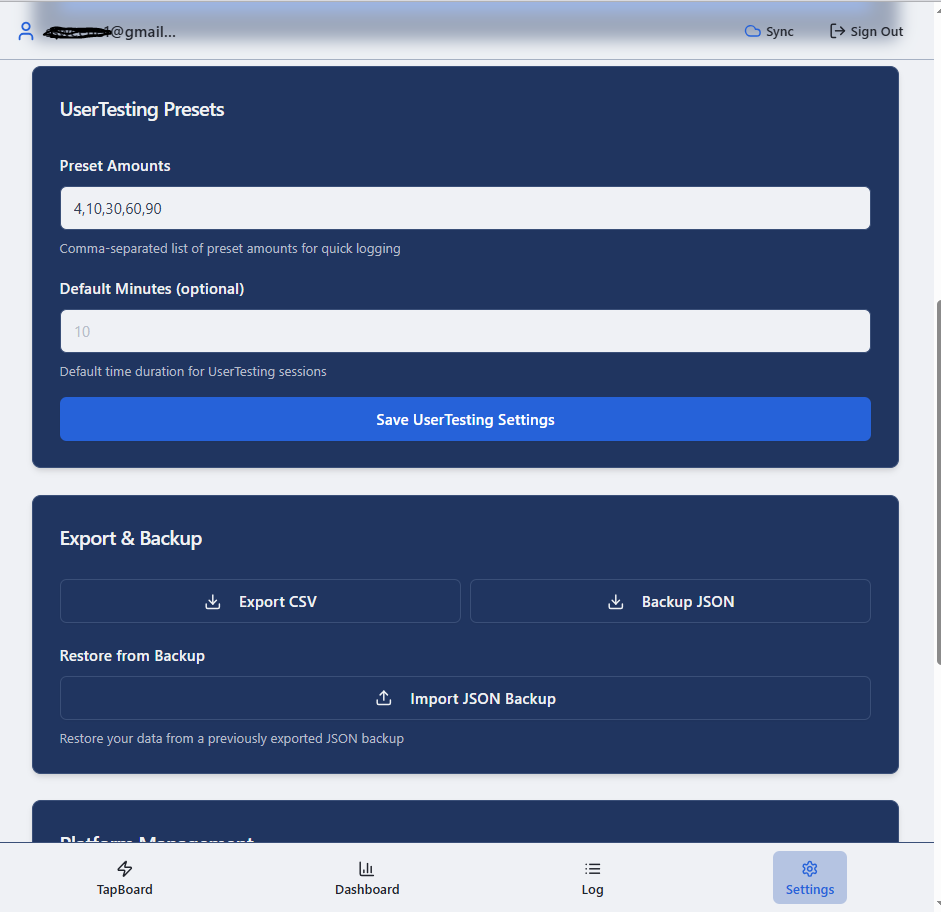
Settings, export, and backup
This view shows editable presets, CSV export, JSON backup, and a restore option.
View full size →From first entry to a useful weekly review
- Open the tracker. The current web entry screen offers Google sign-in and an email flow. Review the current terms and privacy information before continuing.
- Set up your active platforms. Start with the few services you actually use. The app listing describes preloaded platforms and custom platform support.
- Choose a recording convention. Decide whether an amount means completed work, approved earnings, or money received. Apply that definition consistently.
- Record the amount and actual time. Correct default minutes when a task takes longer or shorter than expected.
- Include unsuccessful effort. Log screenouts and retain checking or application time in your records. Do not count the same minutes in two entries.
- Review once a week. Check for mistakes, reconcile with platform records, and keep an export or backup when appropriate.
The Google Play listing also describes cross-device sync, offline logging, and later syncing. Before relying on offline or cross-device behavior, confirm that your own entries appear where you expect them. That is especially useful after switching devices or reconnecting.
Avoid double-counting: If you log a completed task today, do not add the same task again when its payout arrives. If you need both work-date and payment-date records, keep that distinction in a separate ledger unless the current app provides the fields you need.
A high hourly figure needs context
An earnings-per-hour figure depends on the minutes behind it. If you enter only successful task time, the result tells you about those tasks. It does not automatically include unpaid screening, checking dashboards, setup, or waiting.
| Illustrative activity | Time | Amount |
|---|---|---|
| Completed test | 20 minutes | $10 |
| Unsuccessful screening and checking | 20 minutes | $0 |
| Whole session | 40 minutes | $10 → $15/hour |
Using only the completed test would show a $30-per-hour equivalent. Including the whole forty-minute session gives $15 per hour. These numbers illustrate a calculation; they are not a measured result from the app or a promised rate for any platform.
The dashboard screenshot includes a platform efficiency score. Treat any score as a prompt to inspect the underlying entries, not a universal ranking. A platform with one unusually good task may look different after several quiet weeks. Your preferred schedule, comfort with the work, and payment reliability matter too.
More attention
Relevant work, reasonable screening, and results you are happy to repeat.
Less checking
Good occasional tasks, but long quiet periods that do not warrant constant dashboard visits.
A pause
Repeated unpaid effort, poor fit, or a routine that costs more attention than it returns.
A small tracking habit beats a complicated system
This tool is especially useful when you alternate between surveys, interviews, usability tests, and microtasks and want to compare them consistently. You can also use it with a single platform if you simply want a clearer activity history.
Keep your entries lightweight enough that you will maintain them. A few accurate fields recorded regularly are more valuable than a detailed system abandoned after three days. You can use a spreadsheet instead if that suits you better; the important part is retaining useful records.
Click Work Tracker is independent of third-party gig and research platforms. Recording a platform name does not mean it endorses the tool, shares data with it, or guarantees that work is available. Keep official payout statements and other records you need alongside your tracker history.
Click Work Tracker FAQ
Where do I open it?
Use the web tracker button on this page. Android users can also visit the linked Google Play listing to check the current app and availability.
Does it automatically pull my gig-platform balances?
The workflow shown here is based on logging entries. Do not assume automatic imports, payout reconciliation, or access to third-party accounts.
Can I track platforms beyond the presets?
The app listing describes custom platform support. Use consistent names so one platform does not become several separate categories in your records.
What if I leave the minutes blank?
Your recorded amounts may still be useful, but they cannot establish a complete effective hourly rate without reliable time data. Include screening and checking time in your wider review.
Are the screenshot earnings typical?
No. The images demonstrate the interface. Their balances, totals, scores, and hourly figures should not be treated as expected earnings.
Is an export a complete accounting record?
Use exports as part of your recordkeeping. Reconcile them with actual payment records; manually entered tracker data can contain errors or use a different timing convention.
Make your next work decision with better information
Record the next task, the time it took, and the attempts that did not pay. Repeat for a week. Then look at which platforms deserve a place in your routine—and which ones can wait.
Product links and public entry flow checked October 22, 2026. Feature descriptions draw on the existing product page, the preserved screenshots, and the official app listing. Current app screens and terms take priority. This page refresh did not include a new signed-in sync, offline, or export test.