
Click Work Tracker: Track Every Gig Platform in One Place
Click Work Tracker is the all-in-one earnings tracking app built for gig workers, online freelancers, survey takers, usability testers, and microtaskers. Whether you’re on UserTesting, Prolific, Connect Cloud Research, Trymata, Clickworker, mTurk, or dozens of other platforms, this tool helps you stay organized, motivated, and in control of your income.
Android App on Google Play • Works on mobile + desktop • Built for multi-platform “Click Work” stacks
Click Work Tracker in a Nutshell (One Dashboard for Every Gig)
Gone are the days of messy spreadsheets, scattered notes, or forgetting how much you earned last week. Click Work Tracker gives you a central dashboard where you can track earnings across multiple platforms and get real clarity on what’s working. It’s especially useful if you rotate between different gig categories—like usability testing, research surveys, and microtasks—because you can log everything in one place and see the “big picture.”
- Category: Earnings + time tracking for click work, online gig platforms, and freelance side hustles.
- What you track: Earnings, platforms, time/effort signals, screenouts, and goal progress.
- Why it exists: Most gig platforms show their numbers, not your full blended income across everything you do.
- Best for: Anyone stacking multiple sites (UserTesting, Prolific, Connect Cloud Research, Trymata, Clickworker, mTurk, and more).
At a glance, you’ll always know: ✅ how much you earned, ✅ where it came from, ✅ how your time is being spent, and ✅ whether you’re on track to hit your daily/weekly/monthly goals. If you treat gig work like a real income stream, this kind of visibility is the difference between “busy” and “profitable.”
Why Click Work Tracker?
Gig work is flexible—but tracking your income shouldn’t be complicated. Most platforms don’t give you full transparency, many make it hard to spot trends, and almost none let you track across multiple platforms at once. Click Work Tracker solves this by giving you a single place to log and analyze everything you do—so you can make smarter decisions with your time.
- Stop guessing: Know your real blended earnings across your entire stack.
- Work smarter: Identify which platforms are worth checking daily vs. weekly.
- Stay motivated: Goals + progress tracking make consistency easier.
- Turn gig work into a system: Treat it like a business, not random clicks.
What You’ll Always Know
- How much you’ve earned (today, this week, this month)
- Where income is coming from (by platform)
- Where time is going (including screenouts/failed attempts)
- If you’re on pace to hit goals before the week/month ends
Key Features (Built for Multi-Platform Gig Work)
Click Work Tracker is designed for real “stack” workflows—where you bounce between surveys, usability tests, microtasks, and niche platforms. The goal isn’t perfect accounting—it’s clarity: what’s paying, what’s wasting time, and what to focus on next.
- Multi-Platform Tracking: Pre-loaded with 15+ popular gig sites, plus custom platform support.
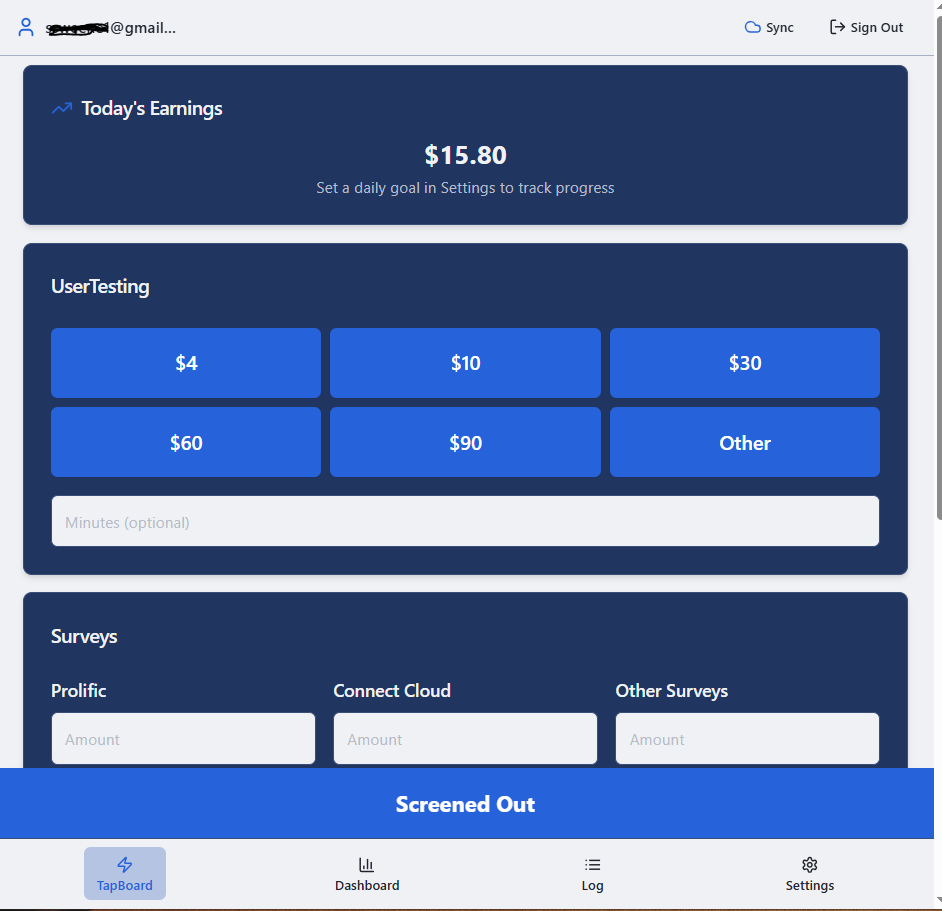
- Quick Entry System: Tap-based logging with preset amounts for fast, no-hassle entry.
- Goal Setting: Set daily, weekly, or monthly income goals and track progress.
- Screenout Logging: Track failed attempts and screenouts so you understand time drains.
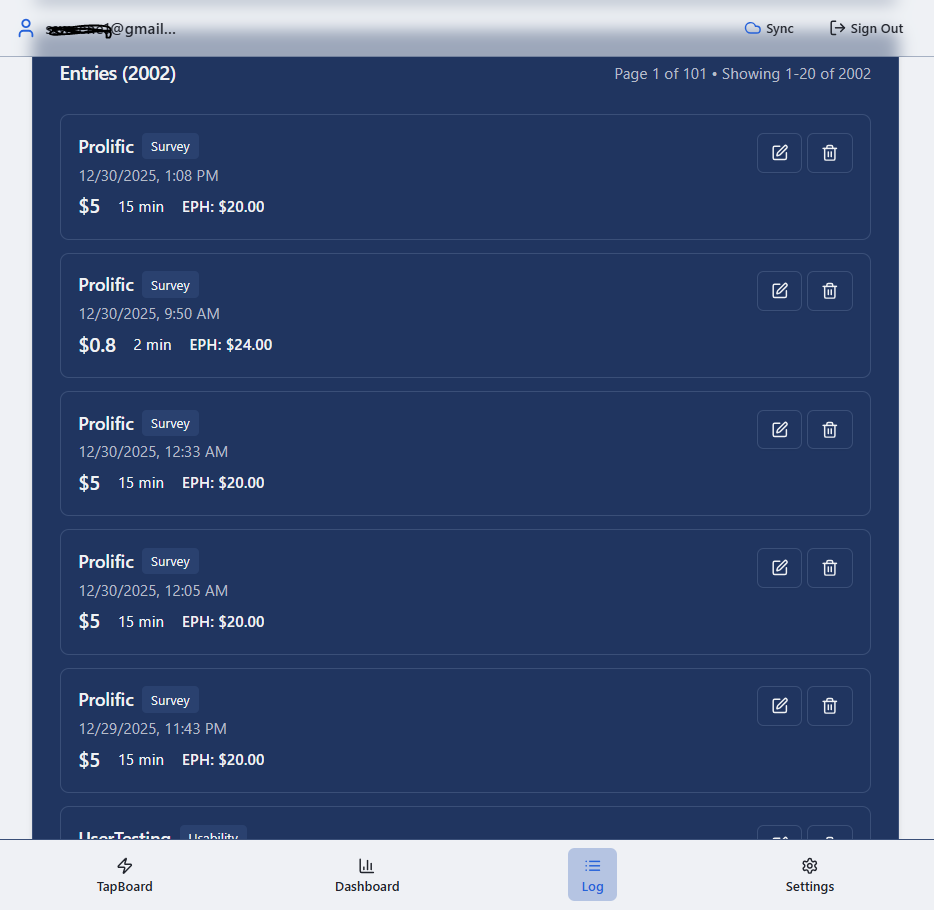
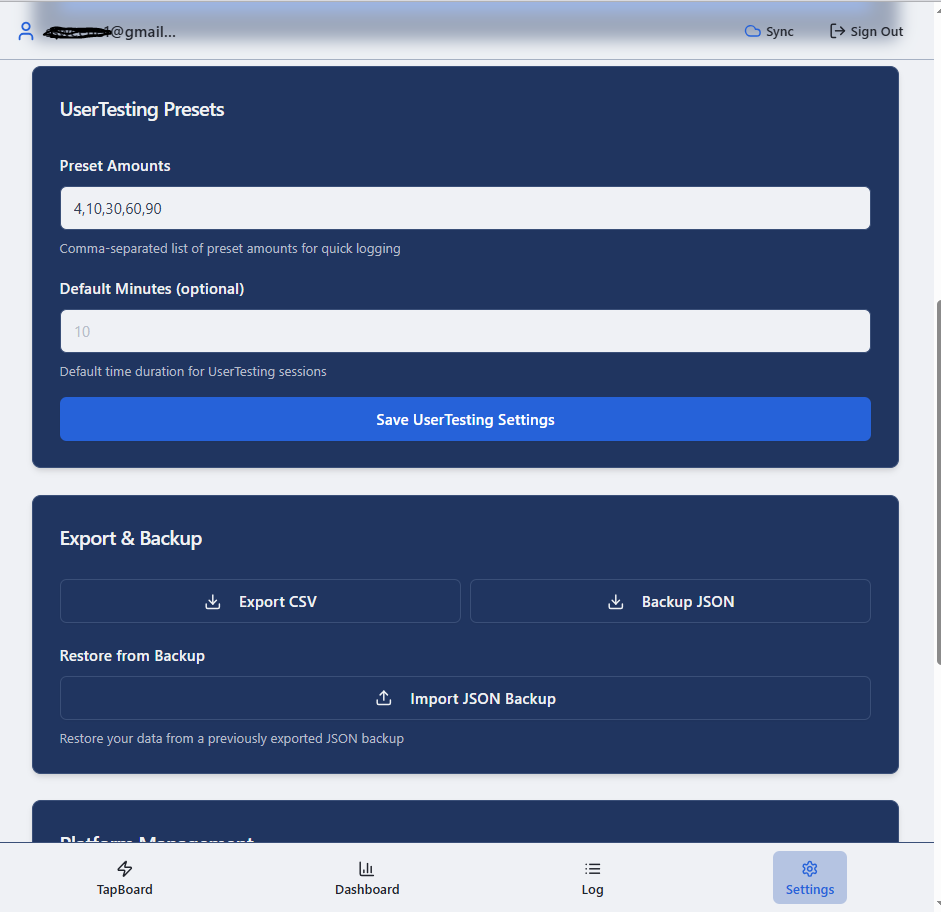
- Export Your Data: Download earnings history for reports, taxes, or personal insight.
- Cloud Sync (Supabase): Secure sync across devices with real-time updates.
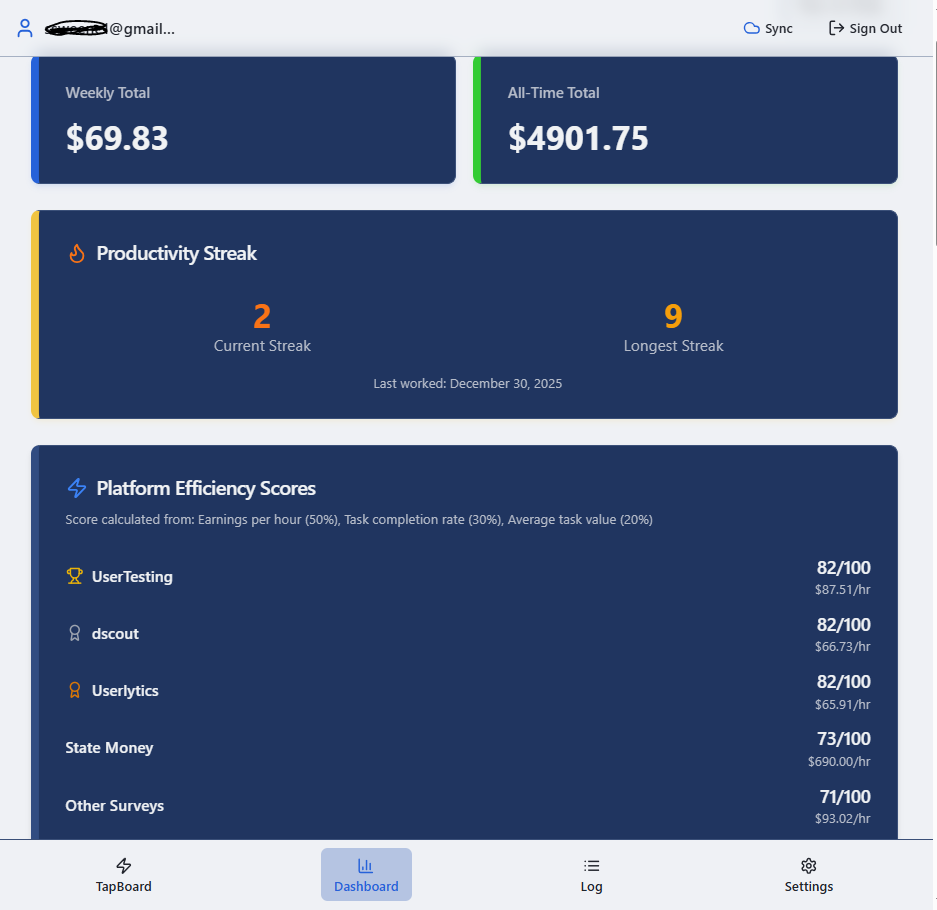
- Analytics Dashboard: Trends, income distribution, and platform performance visualizations.
- Works Offline: Log anytime; data syncs automatically when you reconnect.
- Google Authentication: Secure one-click login with your Google account.
- Mobile Optimized: Responsive design built for phones and desktops.
App Screenshots
These screenshots show the general UI and tracking flow (web + mobile responsive views).
How It Works (From First Log to Real Insights)
The best tracking system is the one you’ll actually use daily. Click Work Tracker is intentionally simple: you log earnings as you go (or once a day), and the app turns that into trend and goal visibility over time. It’s designed around real click-work behavior—platform hopping, streaks, downtime blocks, and the unavoidable reality of screenouts.
- 1) Sign in: Use Google authentication for quick, secure access.
- 2) Add platforms: Choose from pre-loaded gig sites or add custom ones.
- 3) Log earnings fast: Tap-based entry with preset amounts to remove friction.
- 4) Log screenouts: Track failed attempts to understand time leaks.
- 5) Review the dashboard: See what’s paying, what’s fading, and how you’re pacing vs. goals.
- 6) Export when needed: Pull history for taxes, reporting, or personal planning.
Works Offline + Syncs Later
If you’re logging from your phone on the go (or your connection is spotty), you can still track entries. When you reconnect, your data syncs automatically. Behind the scenes, Click Work Tracker uses cloud sync (Supabase) so your numbers stay consistent across devices.
Who Is Click Work Tracker For?
- Survey Takers: Monitor daily payouts across multiple panels without confusion.
- UX Testers: Track tests across UserTesting, Trymata, Userlytics, and more.
- Microtaskers: Keep consistent totals across mTurk, Clickworker, and similar work.
- Freelancers & side hustlers: Blend gig earnings into one clean view.
- Part-time earners: Hit weekly targets and keep consistency.
- Full-time gig pros: Treat gig work like a business with real visibility.
- Stack builders: Optimize your “core platforms” vs. your filler platforms.
- Anyone tired of spreadsheets: Keep tracking fast, simple, and repeatable.
Benefits You’ll Actually Feel
- See the Big Picture: Understand which platforms are worth your time (and which ones aren’t).
- Stay Motivated: Goals + progress visibility make it easier to stay consistent.
- Work Smarter: Spot trends, avoid low-paying loops, and reduce wasted time.
- Boost Accountability: Turn gig work into a measurable income stream.
- Organize Easily: One clean place for everything—no more hunting across dashboards.
Note: Click Work Tracker is not affiliated with UserTesting, Prolific, or any other third-party platform. It’s an independent tool designed to help gig workers manage and analyze earnings across the platforms they already use.

Start Tracking Your Full Click Work Stack Today
Log earnings from surveys, usability tests, microtasks, and niche platforms in one place—then use the dashboard to see what’s paying and what’s wasting time. Simple tracking turns gig work into a system.
FAQ (Quick Answers)
- Is Click Work Tracker free?
Yes—there’s a free web tracker you can use at the link above, plus an Android app on Google Play. - Can I track any platform?
Yes. Use the pre-loaded platforms or add custom entries to match your workflow. - Does it work on mobile?
Yes. It’s mobile-optimized and works on smartphones and desktops. - Can I track screenouts?
Yes. Screenout logging helps you see where time gets burned without pay. - Is it affiliated with UserTesting/Prolific/etc.?
No. It’s an independent tracking tool built for gig workers.
Final Verdict: If You Stack Gig Platforms, You Should Track Them
Click Work Tracker is built for the reality of the gig economy: multiple platforms, inconsistent volume, screenouts, and constantly shifting “what’s worth your time.” If you’re serious about building a reliable Click Work Stack, tracking is non-negotiable—and this app makes it easy to stay consistent without living in spreadsheets.
- Great fit if: You use 3+ platforms and want a clean “one dashboard” view.
- Even better if: You’re trying to hit daily/weekly goals and want accountability.
- Use it casually if: You only run one platform occasionally and don’t care about trend visibility.