

OneForma Review: Global Data, AI & Localization Gigs from Home
This is a click-worker focused review of OneForma, a remote platform offering data, AI training, linguistic, and testing projects. Instead of quick $0.50 surveys, you’re working longer-term tasks—transcription, annotation, search relevance, and localization—with payouts that can beat most survey apps when you land the right project.
OneForma in a Nutshell (Remote Data & Linguistic Work)
OneForma is a global freelancing and microtask platform focused on AI data, language, and testing projects. Think search relevance, transcription, annotation, translation, speech collection, and user experience testing—often for big-name tech clients working through vendors behind the scenes.
- Category: Remote AI/data training, localization, and long-form microtasks.
- How you earn: Fixed-rate or hourly projects you complete from home on your own device, with payouts after client review.
- Payouts: Typically via PayPal, Payoneer, or bank transfer (depends on your country and project type).
- Best for: People who want consistent remote gigs, are comfortable with guidelines, and don’t mind repetitive but higher-value tasks compared to most survey apps.
This OneForma review is written through a Click Work Stack lens: how it fits next to data annotation, UHRS-style work, and survey panels, and what kind of earnings pattern you can expect if you actually get into a solid project.
How OneForma Works (From Sign-Up to First Project)
OneForma is more structured than a typical survey site. You build a profile, apply to specific projects, sometimes take tests, and then work under very detailed guidelines. Once you’re onboarded to a project, it can behave like a part-time remote job rather than a one-off task.
- 1. Create your account & profile: Add your location, native language(s), and any relevant skills—translation, linguistics, IT, testing, etc.
- 2. Browse open projects: Use the internal project board to find data, AI, and language gigs that match your skills and country.
- 3. Apply & complete tests: Many projects require a small test, NDA, or onboarding questionnaire before you’re accepted.
- 4. Learn the guidelines: Download PDFs or web-based instructions that explain exactly how to label, rate, or transcribe the data.
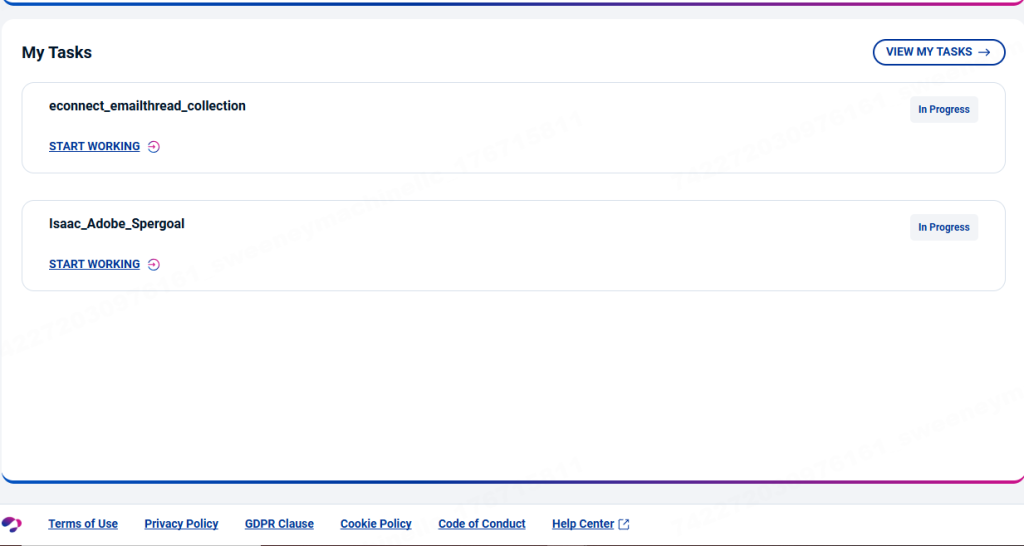
- 5. Start working in the tool: Use OneForma’s platform or a client tool to complete tasks—often in batches or hourly blocks.
- 6. Track your time & submissions: You may be paid per task, per hour, or per milestone. Accurate logs matter for getting paid correctly.
Some projects are short-term sprints, others run for months. The sweet spot is landing a long-running project that fits your schedule and pays fairly for your region.
Examples of OneForma Project Types
- Search relevance: Rating how good or bad search results are for certain queries.
- Data annotation: Tagging images, texts, or audio clips for AI training.
- Transcription & speech: Transcribing audio, validating speech clips, or recording your own voice.
- Localization & translation: Reviewing or translating app strings, ads, or content into your language.
- Testing & UX: Trying out apps or content in your region and reporting issues.
Pros, Cons & Red Flags to Know Before You Commit to OneForma
OneForma can feel like “real remote work” compared to many click apps—but it also has the usual vendor-platform friction: competition, onboarding hoops, and project dry spells. Here’s the honest breakdown.
What OneForma Does Really Well
- Remote-first: Almost everything is done from home on your own schedule.
- Longer-term projects: Once accepted, some projects run for weeks or months, offering more stability than one-off surveys.
- Global-friendly: OneForma recruits in many countries and languages, making it attractive outside the US.
- Skill-building: You build experience in AI data, localization, and QA—useful for future remote job applications.
- Stack-friendly: You can pair OneForma with other data platforms (Appen, Telus, Clickworker) and surveys for a diversified stack.
Where OneForma Falls Short (Potential Dealbreakers)
- Project-based instability: Great projects can end suddenly, with nothing similar open right away.
- Testing & onboarding hoops: Some applicants spend time on tests and never get selected.
- Guideline overload: Data and AI work comes with long, dense instructions—not ideal if you hate details.
- Rates vary a lot: Pay can feel strong in some regions and just okay in others, especially given mental load.
- Communication delays: Vendor-style support can be slow or generic when you want quick answers.
None of these are a hard “no”—but you should go in knowing this is project work with competition, not a guaranteed remote salary.
Track OneForma Like a Real Remote Side Job, Not a Mystery
Use the Click Work Tracker to log OneForma hours, tasks, and payouts—alongside surveys, data gigs, and passive apps—so you know your true blended hourly rate.
What Can You Realistically Earn with OneForma?
Earnings on OneForma depend on project type, your country, your language, and how many hours you can reliably give. There’s no single hourly rate—but some projects clearly beat survey money when you score them.
- Short tasks & sprints: Quick one-off projects can pay okay but may be gone fast.
- Ongoing projects: Search relevance, annotation, and linguistic work can behave like a part-time job for a stretch.
- Language premiums: Less common language pairs or specialized skills sometimes pay more.
- Region effects: What feels “good pay” in one country may feel average in another—your cost of living matters.
The real question isn’t “How much does OneForma pay?” but “How does my OneForma rate compare to my other click work options?” That’s where tracking comes in.
Example “OneForma-Heavy” Week in a Click Work Stack
- Mon–Thu: 2–3 hours per day on an ongoing OneForma annotation or relevance project.
- Fri: Focus on Prolific or usability testing sessions while your brain is fresher for spoken feedback.
- Weekend: Low-effort surveys, passive apps, and a bit of cleanup work on any OneForma backlog.
- Monthly view: OneForma becomes a core online earner with surveys and local gigs smoothing the ups and downs.
Not every week will be that clean, obviously—but when you have a live project, OneForma can easily become a pillar of your online earning plan.
Requirements, Setup & Onboarding Checklist for OneForma
- Device: A reliable computer or laptop; some projects may support mobile for specific tasks, but desktop is your main tool.
- Internet: Stable broadband connection; upload-heavy tasks (audio, video) need consistent speeds.
- Language skills: Good command of your working language(s); extra languages open more projects.
- Attention to detail: Ability to follow multi-page guidelines without cutting corners.
- Payment method: Access to a supported payout option like PayPal or Payoneer, depending on your region.
Onboarding To-Do List
- Complete your profile with accurate location and language info; don’t fluff credentials.
- Scan the project board regularly and apply early when a role fits your skills.
- Set aside focused time to study guidelines before your first real batch of tasks.
- Keep a simple spreadsheet or use the Click Work Tracker to log hours vs. output from day one.
- Decide boundaries: what types of projects you’ll take or decline (content type, topics, minimum rate).
Tips to Succeed on OneForma & Protect Your Hourly Rate
- Invest in guidelines early: The first few hours are slower; once you internalize rules, your hourly climbs.
- Ask clarifying questions: Use project channels or support to confirm edge cases instead of guessing.
- Track sample tasks: Time yourself on small batches to see whether a project’s rate is worth continuing.
- Protect your focus: Data work punishes distractions; shorter, focused blocks beat long, distracted marathons.
- Save notes: Keep your own mini-cheat sheet for each project with rule reminders and common mistakes to avoid.
Strategy: Blend OneForma with Other Remote Gigs
- Use OneForma as a core data/AI pillar alongside platforms like Clickworker, Appen, and data annotation vendors.
- Add Prolific and usability testing for higher-paying bursts when your voice and brain are fresh.
- Lean on passive and cashback apps to trim expenses without more active work hours.
- Rotate project types (annotation vs. transcription vs. testing) to avoid burnout on any one kind of task.
- Re-evaluate projects monthly and drop anything that consistently drags your overall hourly down.
Where OneForma Fits in a Click Work Stack
OneForma works best as a core online earner or strong secondary pillar, not just a “check sometimes” app. When you have a live project, it can anchor your daily remote-work routine.
As a Core Earner
- Use OneForma as your main weekday focus when a solid project is active.
- Layer in Prolific, usability testing, and survey stacking to diversify income streams.
- Mix in local gigs (Instawork, Gigwalk, IVueIt) if you want offline days away from the screen.
- Keep your Click Work Tracker as the control panel showing how each platform contributes monthly.
When to Keep OneForma Casual (or Skip)
- You dislike long guidelines, detailed rules, or repetitive data work.
- You’ve tried several projects and never passed onboarding tests despite best effort.
- Your region rarely gets new projects, so you spend more time waiting than working.
- You already have a better-paying remote gig that uses the same mental energy and hours.
In those cases, OneForma can stay in your “back pocket” list while you focus on platforms that clearly outperform it for you.
Quick OneForma FAQ
Here are straightforward answers to questions like “Is OneForma legit?” and “Is OneForma worth it?” that people search before committing time.
- Is OneForma legit?
Yes. OneForma is a legitimate vendor platform used by real companies for AI, data, and localization work. Legit doesn’t mean every project pays amazing or runs smoothly—but it’s not a scammy “get rich quick” site. - What kind of work is on OneForma?
Mostly data labeling, AI training, linguistic projects, transcription, and testing. It’s closer to “remote work lite” than random penny-click tasks. - Do I need experience?
Formal experience helps but isn’t always required. Many people start with simpler annotation or relevance projects and build from there. - How does OneForma pay?
Payment methods vary by region and project, but commonly include options like PayPal or Payoneer, typically on a monthly or project-based schedule once work is approved. - Is OneForma worth it?
It can be very worth it if you get into a good project, track your time, and treat it like real work. It’s less worth it if you only ever see low-rate tasks or hate the mental load of guideline-heavy projects.
Final Verdict: Who Should Prioritize OneForma (and Who Should Skip It)?
OneForma is one of the more serious remote click work options for people who can handle guidelines and don’t mind repetitive AI/data tasks. It shines when you approach it like a part-time job, not a casual tap-and-earn app.
- Great fit if: You’re detail-oriented, want remote data or localization experience, and are willing to grind through onboarding to reach better projects.
- Good secondary earner if: You mainly rely on other gigs (like Prolific or usability testing) but want a steady-background project you can clock into daily.
- Keep it casual or skip if: You dislike rule-heavy work, get overwhelmed by guidelines, or already have remote gigs with better pay and less mental load.
If you’re building a serious Click Work Stack, OneForma deserves a focused 3–4 week experiment: apply to multiple projects, track your time and pay, and then decide whether it earns a permanent slot in your core online lineup.